Every blog that has been running for a few years carries a back catalogue nobody has looked at in a while: posts about a tool you no longer use, three articles answering the same question, an announcement for an event that happened in a different decade. Sooner or later someone suggests a clean-out. The instinct is reasonable. The usual method, deleting whatever is oldest, is not. This post gives a four-question check you can run on each old page, and how to carry out each answer without breaking links or confusing search engines.
Old is not the problem
In August 2023, Gizmodo reported that CNET had removed thousands of older articles in an effort to perform better in Google Search. Google's Search Liaison, Danny Sullivan, responded publicly: if people were deleting content because they believed Google does not like "old" content, that is "not a thing". As reported at the time, he also warned not to assume that deleting something only because it is old will improve a site's SEO, while acknowledging that on very large sites, removing pages can affect how other pages get crawled.
He later made the same point more simply: something being older does not make it unhelpful. A five-year-old post that still answers its question accurately is an asset. A five-month-old post that is wrong is a liability. The decision has to be made page by page, on what the page does for a reader today.
The four outcomes
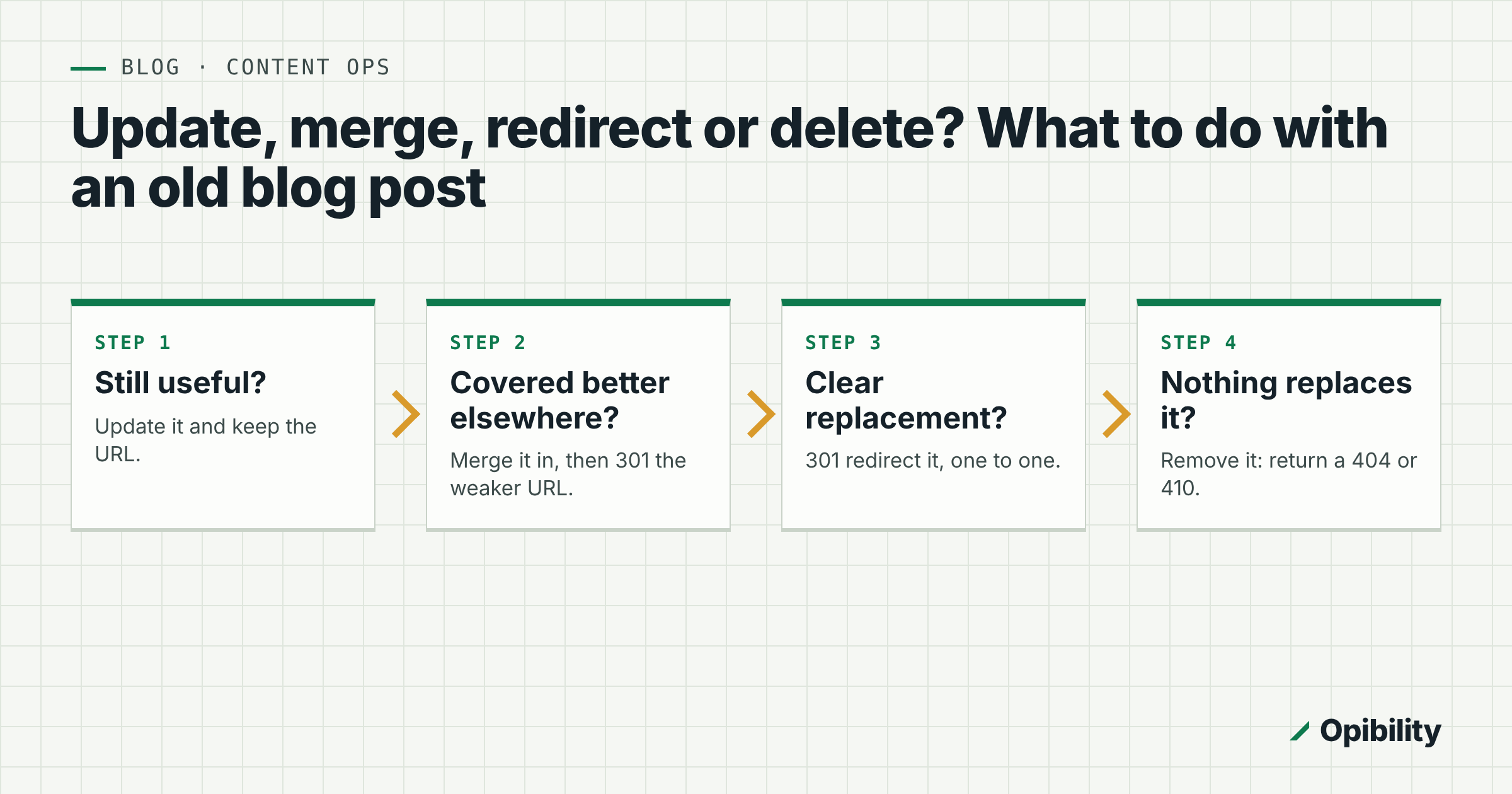
Every old post ends up in one of four places:
- Update. The page still answers a question people have. Bring the facts, steps and examples up to date and keep the URL.
- Merge. Another page on your site covers the same question, and covers it better. Move anything unique into that page, then redirect the weaker URL to it.
- Redirect. The topic has a clear replacement elsewhere on the site, such as a newer guide or a product page that superseded an announcement. Send the old URL there permanently.
- Remove. Nothing on the site replaces it and nobody needs it. Take it down and let the URL return a 404 or 410.
A four-question check for each old post
Ask the questions in order and stop at the first yes:
1. Is it still useful to a reader who lands on it today? If the question it answers is still asked and the page can be made accurate, update it. This is the default, and the cheapest outcome that keeps whatever links and history the page has earned. When the update is substantial, change the date honestly; we covered when a new date is earned in should you change the date when you update an old blog post.
2. Does another page on your site cover the same question better? Two posts competing for one question split readers and links between them. Merge: take any section, example or data point the weaker page has that the stronger one lacks, add it to the stronger page, then 301 redirect the weaker URL to it.
3. Is there a clear replacement for it? If the page has moved, or something on the site has clearly superseded it, Google's guidance on HTTP status codes is to return a 301 permanent redirect to that page.
4. Nothing replaces it? Then remove it. For a removed page with no replacement on the site, the same Google guidance is to return a 404 (not found) or 410 (gone). Google handles the two almost identically: the URL drops out of the index and gets crawled less often over time.
Doing each one properly
Redirects go one to one, to a relevant page. The tempting shortcut is to point every removed URL at the homepage. Google's site-move guidance warns against redirecting many old URLs to one irrelevant destination like the home page, and Google's John Mueller has said that such redirects tend to be treated as soft 404s anyway. A reader who clicked a link about one specific question and lands on your homepage has been sent nowhere. If there is no genuinely related page, a 404 is the honest answer.
Keep redirects in place for the long term. Google's site-move guidance says to keep redirects for as long as possible, generally at least a year, so signals such as links from other sites can carry over to the new URL. For a blog, there is rarely a good reason ever to take one down.
Clean up behind every change. After a merge, redirect or removal, update internal links that pointed at the old URL so they go straight to the right page, take the old URL out of your sitemap, and remove it from any site-search index or "related posts" list. A sitemap that still lists deleted or redirected pages is asking search engines to crawl URLs you have retired.
Keep a log. One line per decision: the URL, the outcome, the target if it was redirected, and the date. When a page's traffic changes months later, or someone asks where an article went, the log is the answer.
What not to do
- Do not prune by publish date. Sort by date to find candidates if you like, but decide on each page's usefulness, not its age.
- Do not redirect everything to the homepage. It confuses readers and, as above, is likely to be treated as a soft 404.
- Do not delete a page that still earns links or visits without checking first. Look at its search traffic and the links pointing to it before choosing an outcome. A page with real visitors is almost always an update or a merge, not a removal.
- Do not leave retired URLs in the sitemap.
The takeaway
An old post is not a problem because it is old. It is a problem when it is wrong, duplicated, or orphaned. Run the four questions on each page, in order: update what is still useful, merge what is duplicated, redirect what has a clear replacement, and remove what nothing replaces. Then clean up the internal links and the sitemap behind each change. Done that way, a back-catalogue review is maintenance, not a gamble. If you are looking for which old posts deserve attention first, Google Search Console shows which pages still draw impressions.
Sources: Gizmodo, CNET Deletes Thousands of Old Articles to Game Google Search (August 2023); Search Engine Land, Google warns against content pruning as CNET deletes thousands of pages (August 2023); Search Engine Roundtable, Google: Old Content Doesn't Make It Unhelpful Content; Google Search Central, How HTTP status codes, and network and DNS errors affect Google Search; Google Search Central, Site moves with URL changes; Search Engine Journal, Google: Keep 301 Redirects In Place For A Year.